
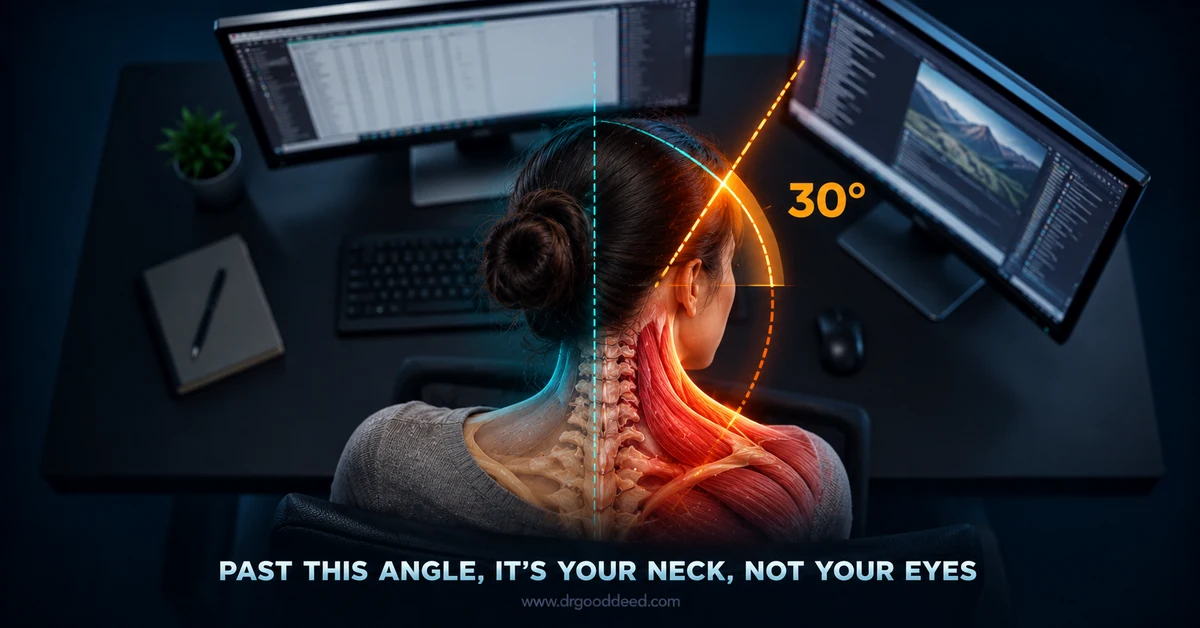

A headache from a dual-monitor setup is often related to digital eye strain, poor screen positioning, glare, excessive brightness, or prolonged neck and shoulder tension rather than the number of monitors itself.
Position both screens directly in front of you with the primary monitor centered and the second angled slightly toward you, keeping the top of the screens around eye level and the viewing distance comfortable. Match brightness and text size across both displays, reduce glare, and avoid constantly turning your head or shifting focus between screens.
Key Takeaways
- A working headache from dual monitors setup fix usually needs three changes together: symmetric placement, matched refresh rates, and matched brightness.
- Neck rotation past 30 degrees for sustained periods is the single biggest driver of one-sided tension headaches in dual-screen users, according to biomechanical monitor research.
- Headaches that start within an hour of screen use and ease within 30 minutes of stopping point to a setup problem. Headaches that persist for days need a clinician, not a monitor adjustment.
Why Dual Monitors Cause More Eye Strain Than a Single Screen
Two screens roughly double the visual switching your eyes perform each hour, and every switch forces your pupils and focusing muscles to readjust for distance, brightness, and contrast. This repeated refocusing is the core mechanism behind digital eye strain, officially called computer vision syndrome.
- Accommodative fatigue: your eye’s lens muscle contracts and relaxes with every shift between screens at different distances, and thousands of these micro-adjustments per day tire the ciliary muscle faster than steady focus on one screen.
- Reduced blink rate: people blink about 15 times per minute normally, but this drops to roughly 5 times per minute during concentrated screen work, which dries the ocular surface in the eye, triggering frontal headaches.
- Peripheral flicker sensitivity: your peripheral vision detects backlight flicker more readily than your central vision, so a secondary monitor sitting at the edge of your visual field can trigger a low-grade headache you never consciously notice as flicker.
- Convergence strain from unequal distances: if one monitor sits closer than the other, your eyes must converge differently for each screen, and this asymmetric convergence effort compounds over an eight-hour shift.
Eye strain from two screens builds as a dull pressure behind the eyes by mid-afternoon, then progresses into a frontal headache.
The Hidden Culprit: Asymmetric Neck Strain and Muscle Spasms
A headache from a dual-monitor setup fix often has nothing to do with vision at all. Asymmetric neck rotation toward a poorly placed secondary screen is an underrated trigger that mimics tension headache and even one-sided migraine.
- Cervicogenic referral pattern: tight suboccipital and trapezius muscles from repeated one-sided head turning can refer pain upward into the temple and behind the eye on the same side, which many people mistake for a screen-related eye headache.
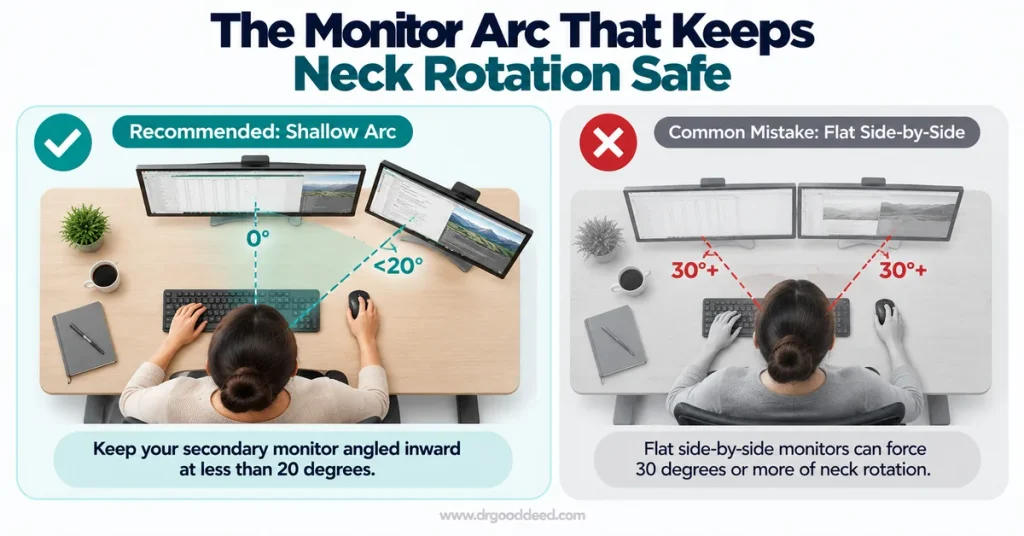
- The 30-degree threshold: dual-monitor arrangements produce sustained neck rotation and higher “twisting scores” than single monitors or wide curved displays, with risk climbing sharply once rotation exceeds roughly 30 degrees.
- Dominant-side loading: if you glance at your secondary monitor far more often than your primary one, the muscles on that side stay contracted while the opposite side lengthens, creating the imbalance that produces one-sided tension headaches.
- Static posture amplification: unlike a single monitor, an off-center secondary screen invites you to hold your head twisted for minutes at a time rather than briefly glancing, and sustained static muscle tension is what converts ordinary use into a spasm-driven headache.
Neck-driven headaches respond to positioning changes faster than most people expect, often within one to two weeks, because the muscle imbalance corrects itself once symmetric posture is restored.
The Settings Check: Resolving Mismatched Refresh Rates and Screen Flicker
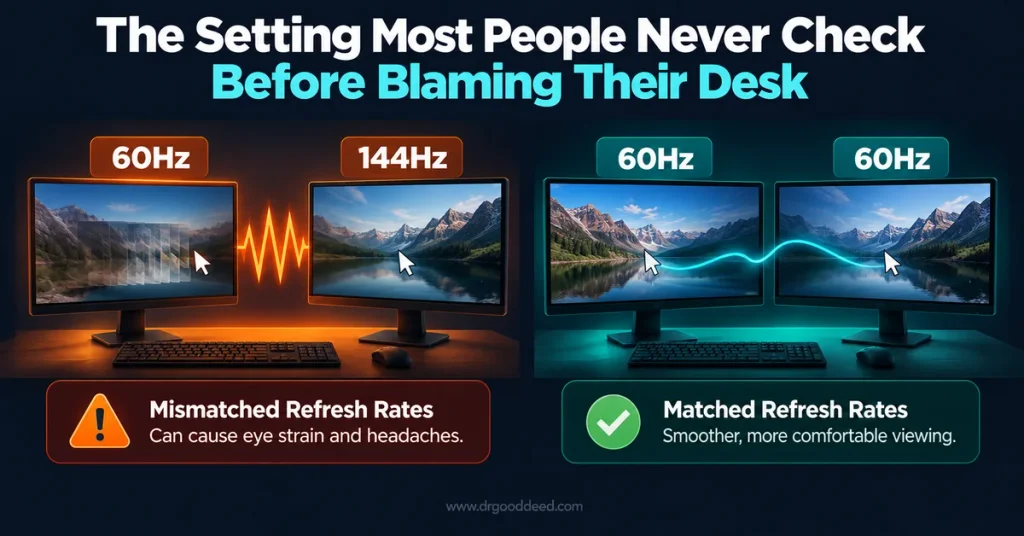
Before touching desk geometry, check your display settings, since a mismatched refresh rate between two monitors is one of the most overlooked triggers behind a headache from a dual-monitor setup fix.
- Mismatched Hz between screens: running one monitor at 60Hz and another at 144Hz forces your visual system to process two different motion cadences side by side, and this inconsistency is often what triggers headaches within an hour.
- PWM backlight dimming: many monitors dim brightness using pulse-width modulation, switching the backlight on and off rapidly rather than smoothly reducing output, and this invisible flicker overworks pupil muscles even when you cannot consciously see it.
- Color and gamma mismatch: two monitors from different manufacturers or generations often render color temperature and contrast differently, and your visual cortex works harder to reconcile the difference every time your gaze crosses screens.
- How to check it fast: open your display settings, confirm both monitors show the same Hz value, set both monitors to the same color profile if your graphics card allows it, and disable low-brightness PWM dimming modes where the option exists.
Pro Tip: If a headache from a dual-monitor setup fix does not improve after positioning changes, test each monitor alone for a full workday before blaming ergonomics, since a single flickering panel on PWM dimming can cause headaches that persist regardless of how well the screens are angled.
How to Set Up Your Monitors to Prevent Headaches
A properly built headache from dual monitors setup fix combines distance, height, brightness matching, and symmetry rather than any single adjustment done in isolation.
Optimal Monitor Positioning, Viewing Distance, and Height
Position both screens 20 to 30 inches from your eyes, matching the range for computer workstations.
- Keep the top edge of each screen at or slightly below eye level so your resting gaze falls 15 to 20 degrees downward, not upward.
- Center your primary monitor directly in front of your body, with the secondary screen angled toward it rather than sitting flat beside it.
Matching Brightness, Contrast, and Resolution Settings
Match brightness and contrast within roughly 10 to 15 percent across both screens, since large differences force constant pupil readjustment as your eyes move between displays.
- Set both monitors to the same resolution scaling percentage where possible, since mismatched text sizing forces one eye to work harder than the other.
- Use a matte or anti-glare finish on at least the screen positioned nearest a window to cut glare-driven squinting.
Implementing a Symmetrical Semicircle or Arc Placement
Angle both monitors into a shallow arc centered on your dominant eye rather than a flat straight line, which keeps neck rotation under roughly 15 to 20 degrees to either side.
- If you use one monitor far more than the other, keep that screen dead center and push the secondary screen further to the side, since occasional glances tolerate more angle than constant focus does.
- Recheck the arc angle after any desk or chair height change, since raising your seat shifts your effective eye position relative to both screens.
Ergonomic Workspace Habits for Dual-Screen Remote Workers
Equipment adjustments only work alongside habits that limit how long you hold any single posture, which matters more with two screens than one.
- Follow a structured break pattern: the 20-20-20 rule, looking at something 20 feet away for 20 seconds every 20 minutes, which resets both focusing muscles and blink rate.
- Rotate primary and secondary roles: if your workflow allows it, alternate which monitor holds your main task through the day so the same neck muscles are not loaded in the same direction for eight straight hours.
- Use a monitor arm over fixed stands: an adjustable arm lets you correct height and angle in seconds rather than tolerating a fixed mismatch for months, which matters most for remote workers who never get a workstation ergonomics assessment.
- Track headache timing: note whether pain starts within the first two hours of screen time or only appears late in the day, since early-onset pain points more toward flicker or brightness, while late-day pain points more toward posture fatigue.
Is a Dual Monitor Display Setup Actually Bad for Your Eyes?
A 2019 systematic review in Human Factors examined multiple monitor configurations and found no strong evidence that two screens are inherently hazardous, though it noted moderate evidence for nonneutral neck postures when setups are poorly arranged.
A headache from dual monitors setup is fixable because the setup is the variable driving symptoms. It is worth ruling out other common headache triggers that mimic screen-related pain before assuming your monitors are the sole cause.
| Other headache trigger | How it differs from a screen-related headache |
| Toothache-related headaches | Pain concentrates around the jaw and temple and often worsens with chewing or cold food |
| Headaches linked to acid reflux | Tend to appear after meals or when lying flat, alongside heartburn |
| Allergy-related headaches | Come with nasal congestion, sinus pressure, and worsen with seasonal exposure |
| Headaches from constipation | Build gradually and ease after a bowel movement, unrelated to screen exposure |
| Creatine and headaches | Can occur during loading phases due to fluid shifts, unrelated to monitor use |
| Headaches caused by dry eyes | Overlap heavily with screen strain but persist even away from any monitor |
| High cholesterol and headaches | Not a direct established link in major guidelines; unexplained headaches warrant separate evaluation |
| Thyroid-related headaches | Accompany fatigue, weight change, or temperature intolerance |
| Sugar and headache triggers | Follow blood glucose swings rather than hours of screen exposure |
| CBD for tension headaches | An unregulated, evidence-limited option some use for tension-type pain, distinct from ergonomic fixes |
Expert Insight: A one-sided headache that worsens specifically during screen use but fully resolves within an hour of stopping almost always points to a mechanical trigger like neck rotation or flicker, while a one-sided headache that persists regardless of screen exposure deserves neurological evaluation rather than another desk adjustment.
When to See an Eye Doctor or Neurologist
Most dual-monitor headaches improve with the fixes above within two weeks. Certain patterns mean the cause is unlikely to be your setup at all.
- Headaches after eating that are unrelated to screen timing, since this points toward a digestive or metabolic trigger rather than a visual one.
- One-sided headache and ear pain together, which can indicate a temporomandibular joint or sinus issue needing dental or ENT evaluation.
- Headaches with fatigue that do not improve with sleep, which may reflect a thyroid, anemia, or sleep disorder unrelated to monitors.
- Period-related headaches that follow a hormonal cycle regardless of screen habits.
- Headaches when lying down, which differ mechanically from upright screen strain and can signal issues needing prompt evaluation.
- Sudden, severe, “worst of your life” headaches, headaches with vision loss, weakness, or confusion need emergency care, not a monitor adjustment.
Recognizing these different types of headaches helps you decide whether an eye exam, a neurology visit, or a simple desk change is the right next step.
FAQs
Should both monitors in a dual-screen setup be the exact same size?
No, but matched height and viewing distance matter more than matching size. Mixed sizes work fine if you align the top edges and keep both within the 20 to 30 inch viewing range.
Can a flexible monitor arm help eliminate dual-screen headaches?
Yes. A monitor arm lets you fine-tune height, distance, and arc angle precisely, correcting the asymmetric positioning that fixed stands and risers usually cannot adjust.
How often should you take screen breaks when working with two monitors?
Every 20 minutes, per the American Optometric Association’s 20-20-20 rule. Two-screen users benefit from following it strictly, since switching between displays accelerates focusing fatigue.
Can multi-monitor computer configurations trigger severe neurological migraines?
Screen glare and flicker are recognized migraine triggers in people already prone to migraine, but multi-monitor use alone has not been shown to cause migraine in people without an existing predisposition.
Is a single large ultrawide curved monitor better than two separate screens?
Often yes for neck strain. Research comparing setups found ultrawide curved displays produced neck loading similar to a single monitor, while separate dual screens required more sustained rotation.
Sources
- OSHA Computer Workstations eTool, Monitors link
- OSHA Computer Workstations eTool link
- American Optometric Association, Computer Vision Syndrome link
- American Academy of Ophthalmology, Computers, Digital Devices and Eye Strain link
- PubMed, Does Using Multiple Computer Monitors for Office Tasks Affect User Experience? A Systematic Review link
- NCBI PMC, Prevalence and Knowledge of Digital Eye Strain Among Undergraduates link
- National Institute of Neurological Disorders and Stroke, Headache Information link
- American Migraine Foundation, Understanding Migraine Triggers link
- CDC/NIOSH, Ergonomics and Musculoskeletal Disorders link
Medical Disclaimer: This article is for general information only and is not medical advice. It does not replace a diagnosis, treatment plan, or guidance from a qualified healthcare professional. Always talk to your doctor about your own symptoms and before starting, stopping, or changing any treatment. If you think you may be having a medical emergency, call 911 or go to your nearest emergency room.